Using the Admin Portal Online Help
The Admin Portal Online Help is available to assist you while you are using the application. You can view the Admin Portal Online Help on any web-enabled device, including a phone or tablet.
-
From the sidebar, select your user name, then select Help. The Admin Portal Online Help opens in a new tab.
Icons and Options in the Admin Portal Online Help
When viewing a topic in the Admin Portal Online Help, you have several options for navigation and search.
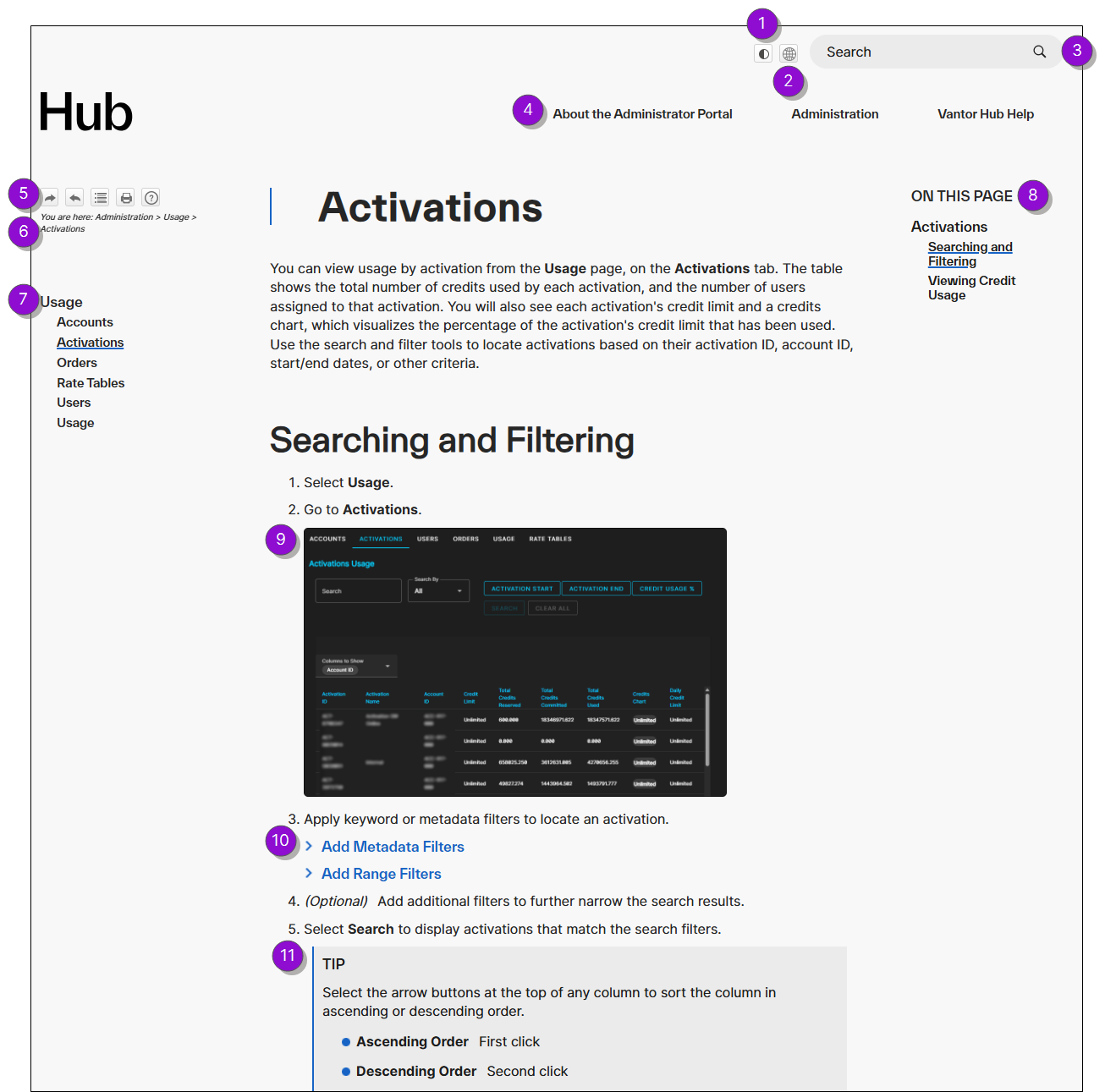
 Expand for Details
| Numbered Area | Description | ||||||||||||
|---|---|---|---|---|---|---|---|---|---|---|---|---|---|
|
1 Light/Dark Mode |
Switch between viewing the Admin Portal Online Help in light or dark mode. Your browser remembers your preference. |
||||||||||||
|
2 Change Language |
Display a list of available languages. Select a language to view the Admin Portal Online Help in that language. By default, the Admin Portal Online Help uses the language set in your browser localization settings. |
||||||||||||
|
3 Search |
Search the entire Admin Portal Online Help for a specific term. |
||||||||||||
|
4 Top Navigation |
Browse the Admin Portal Online Help using the top navigation menu. Select a topic to open it. When viewing the Admin Portal Online Help on a smaller screen, the top navigation menu does not display. Instead, select the menu |
||||||||||||
|
5 Help Controls |
Navigate the Admin Portal Online Help, print topics, and more. View Help Controls
|
||||||||||||
|
6 Breadcrumbs |
View your relative location in the help system. Breadcrumbs are linked, so you can select any portion of the path to jump to that page in the Admin Portal Online Help. | ||||||||||||
|
7 Section Navigation |
Browse topics in the current Admin Portal Online Help section from the left-side navigation menu. Section navigation is not available on smaller screens. |
||||||||||||
|
8 Page Navigation |
Browse headings on the current page. Select a link to jump to that heading. Page navigation is not available on smaller screens, such as phones and tablets. |
||||||||||||
|
9 Image |
Select an image to expand its thumbnail. Thumbnail images allow each topic to load quickly and scroll smoothly. If a thumbnail image does not provide enough detail, select it to view a larger image. |
||||||||||||
|
10 Drop-Down Content |
Some content in the Admin Portal Online Help—such as lists, additional information, or steps with multiple options—is nested within drop-down menus. This allows topics to load quickly and scroll smoothly. Select the Expand All Drop-Downs |
||||||||||||
|
11 Notes |
Notes, tips, and other information boxes appear throughout the Admin Portal Online Help to call your attention to supplemental helpful information. Note Types
The general note types are:
|
 to open or close a right-side navigation menu and navigate the


Using Enhanced Search and the Glossary
Searching for selected terms and phrases displays a sidebar with helpful definitions and information.
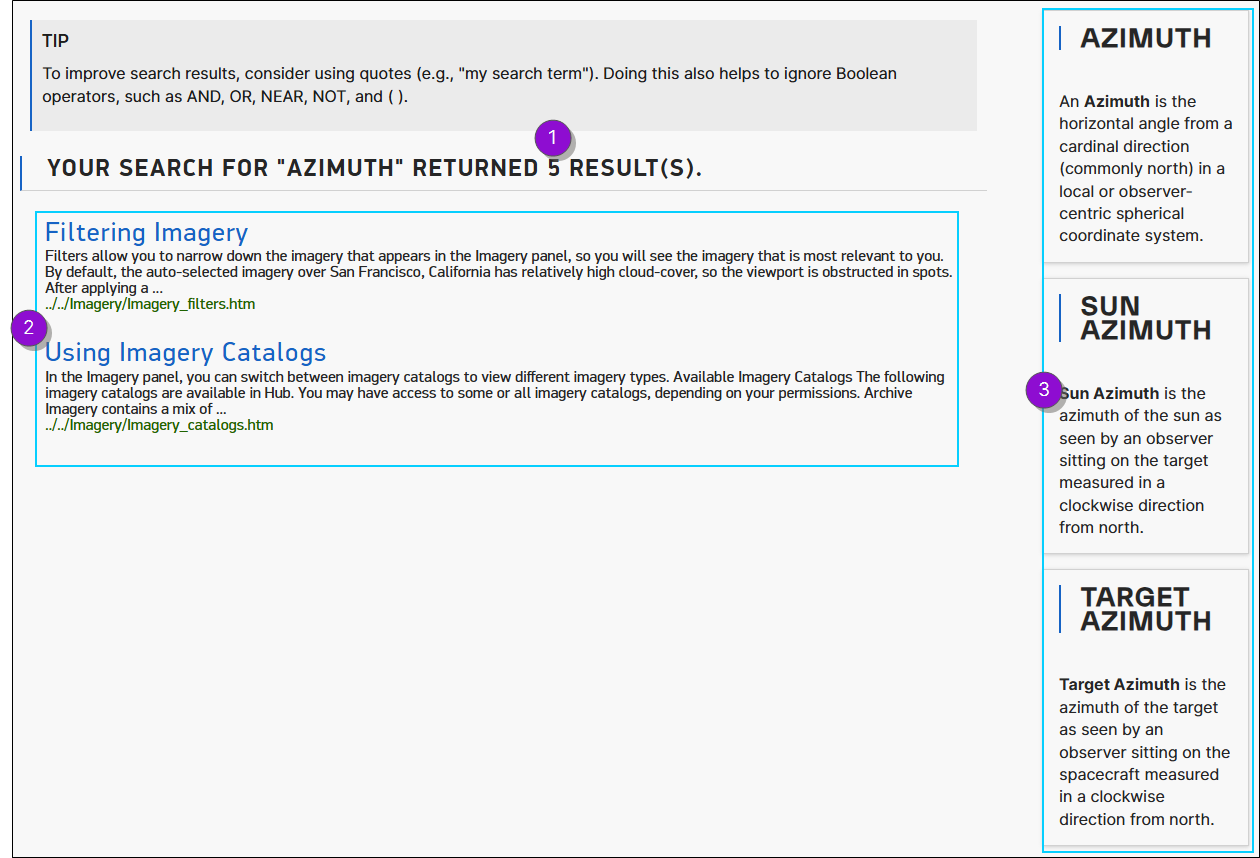
Expand for Details
| Numbered Area | Description |
|---|---|
|
1 Total Search Results |
This is the total number of search results. It includes both the number of regular search results (help topics) and the number of enhanced search and glossary results. In the example above, there are 5 search results because there are 2 help topics and 3 enhanced search results. |
|
2 Regular Search Results |
Regular search results point to standard topics within the help system. Select any topic to open that page within the help system. |
|
3 Enhanced Search and Glossary Results |
Enhanced search results and glossary terms appear on the right side of the page. These generally provide short definitions relevant to the term you searched for. Some results may feature images, links, or multimedia. |